Showing posts with label Themes. Show all posts
Showing posts with label Themes. Show all posts

Milk RC for Windows Seven

Milk RC for Windows 7 | by technoseven | 4.4 MB
Download
* How to install *
1-Download and install the universal theme patcher [Here]
2-Extract content (Win8T2) into C:\Windows\Resources\Themes
3-Double-click on Win8T2.theme
4-Restart your Computer To make sure that everything takes effect
Windows 8 Chromatic blue

Windows 8 Chromatic blue | by aymenGH99 | 2.3 MB
Download
Windows 8 CHROMATIC Blue (visual style)
* Compatible only for windows 7 SP1 (x64 and x86)
* Use it if you have your superbar on bottom (Recommended)
* How to install *
1-Download and install the universal theme patcher [Here]
2-Extract content (Win8T2) into C:\Windows\Resources\Themes
3-Double-click on Win8T2.theme
4-Restart your Computer To make sure that everything takes effect
Re-Wired Alternative For windows 7

Re-Wired Alternative For windows 7 | by InCris | 3.1 MB
Download
Theme Name: Re-Wired Windows 7 Alternative
Gallery Folder: Windows 7 Themes
OS Type: 32 Bit & 64 Bit (Explorer.exe & ExplorerFrame.dll only work on 32 Bit)
Files Included: Theme + Background; System Files (Explorer.exe(Start Button) & ExplorerFrame.dll(Navigation Buttons)); 1 Preview; Read Me & Instructions;
File Size: 3.90 MB
Further Updates: Probably
Master Colors: Black; Gray; White;
Made In: Adobe Photoshop CS3 Extended
Note: Close Button Hovered
* How to install *
GO HERE
Silver Mac theme For Windows Seven

Silver Mac theme For Windows 7 | by Liuxiaofei | 31.8 MB
* Note *
This is a new theme of mine with silver is the main color. In the last theme calls "Perfect Mac theme", there are some bugs with Properties Windows borders, Start Menu and in this theme, all of them were repaired.
Download
* How to install *
GO HERE
Elemental: Snow Theme for windows seven

Elemental: Snow Theme for windows seven | by minhtrimatrix | 6.6 MB
* Note *
There are just 2 versions for Top and Bottom Taskbar.
Sometimes you have to re-install Universal Theme Patcher again.
Download
* How to install *
1. Install Universal Theme Patcher, re-patch again if you updated to SP1.
2. Copy everything in themes folder (Elemental (Snow)folder, E - Snow (Bottom), E - Snow (Top)) into C:\Windows\Resources\Themes
3. Restart Windows & then select this theme in Personalize Menu
4. Use "Windows 7 Navigation Buttons Customizer" to change BMPs for explorerframe.dll
5. Use "Windows 7 Start Button Changer" to change Start orb (there are 2 versions: Top & Bottom)
6. Run "Windows 7 Aero Blur Tweaker" and select Hide Blur.
* Mor info *
HERE
Slave Theme for Windows 7

SLAVE Theme for Windows 7 | by GuillenDesign | 10.5 MB
src="http://pagead2.googlesyndication.com/pagead/show_ads.js">
Slave - Theme for Windows Seven 32bit(x86)
Download
- Theme Includes -
* Visual Style
* Slave AvePreview
* Font
* Taskbar Drop Shadow
* Universal Theme Patcher
* Explorer.exe (and bmp)
* ExplorerFrame.dll (and bmp)
* OobeFldr.dll (and bmp)
* Shell32.dll (and bmp)
src="http://pagead2.googlesyndication.com/pagead/show_ads.js">
How to install
1. Install Universal Theme Patcher, make sure that UAC must be turned off
2. Copy and paste content of the folder 'Visual Style > Slave' (*.theme & folder) into C:\Windows\Resources\Themes
3. To change the system files: use the program 'Windows Themes Installer' by kishan-bagaria [link]
4. Restart Windows & then select this theme in Personalize Menu

Modern Final [ Windows 7 Visual Style ]

Modern Final Windows 7 Visual Style | by pedrocasoa | 38 MB
src="http://pagead2.googlesyndication.com/pagead/show_ads.js">
Download
included:
* theme
* 30 wallpapers
* explorer frame
* start orbit "explorer.exe"
* Universal Theme Patcher
How to install
* Go Here
src="http://pagead2.googlesyndication.com/pagead/show_ads.js">
Pragmatic 3.0 Rainmeter Skin

Pragmatic 3.0 Rainmeter Skin | by kevin-utkarsh | 3.9 MB
src="http://pagead2.googlesyndication.com/pagead/show_ads.js">
Download
src="http://pagead2.googlesyndication.com/pagead/show_ads.js">
Static 2.0 Visual Style for Windows 7


Leaf The green theme for nokia

Leaf The green theme for nokia | 750 KB
src="http://pagead2.googlesyndication.com/pagead/show_ads.js">
DownloadLink 1 (Direct)
Theme For Nokia C3 Touch and Type (C3-01)
.. as well as for (X3-02)
please comment
src="http://pagead2.googlesyndication.com/pagead/show_ads.js">

Polymer for Windows 7

Mac OS X Lion ObjectDock Theme

Here is the Mac OS X Lion 10.7 ObjectDock Theme. Included are the dock theme and the stack docklet.
Here's how to set it up:
DOCK THEME
1. Copy the Mac OS X Lion Dock folder to: C:\Program Files -OR-Program Files (x86)\Stardock\ObjectDock\Backgrounds\Non-Tabbed
2. Press Configure Dock (In Dock) > Appearance > Background: Mac OS X Lion > OK
3. Press Configure Dock > Positioning > Reserve Edge of Screen > Keep on Top > OK
STACK DOCKLET
1. Copy the StackDocklet folder to: C:\Program Files -OR-Program Files (x86)\Stardock\ObjectDock\Docklets
2. Open the ObjectDock Settings (In Dock) > Drag StackDocklet down to dock
Here is a link to the Mac OS X Lion 10.7 Theme Here
src="http://pagead2.googlesyndication.com/pagead/show_ads.js">
Mac OS X Lion 64-Bit Theme For windows xp

[How to install]
1. Go to the CustoPack website: [link]
2. Download and install CustoPack Tools.
3. Double click on Mac OS X Lion> Keep pressing yes, next, ok and stuff like that
4. the dock go here: [link]


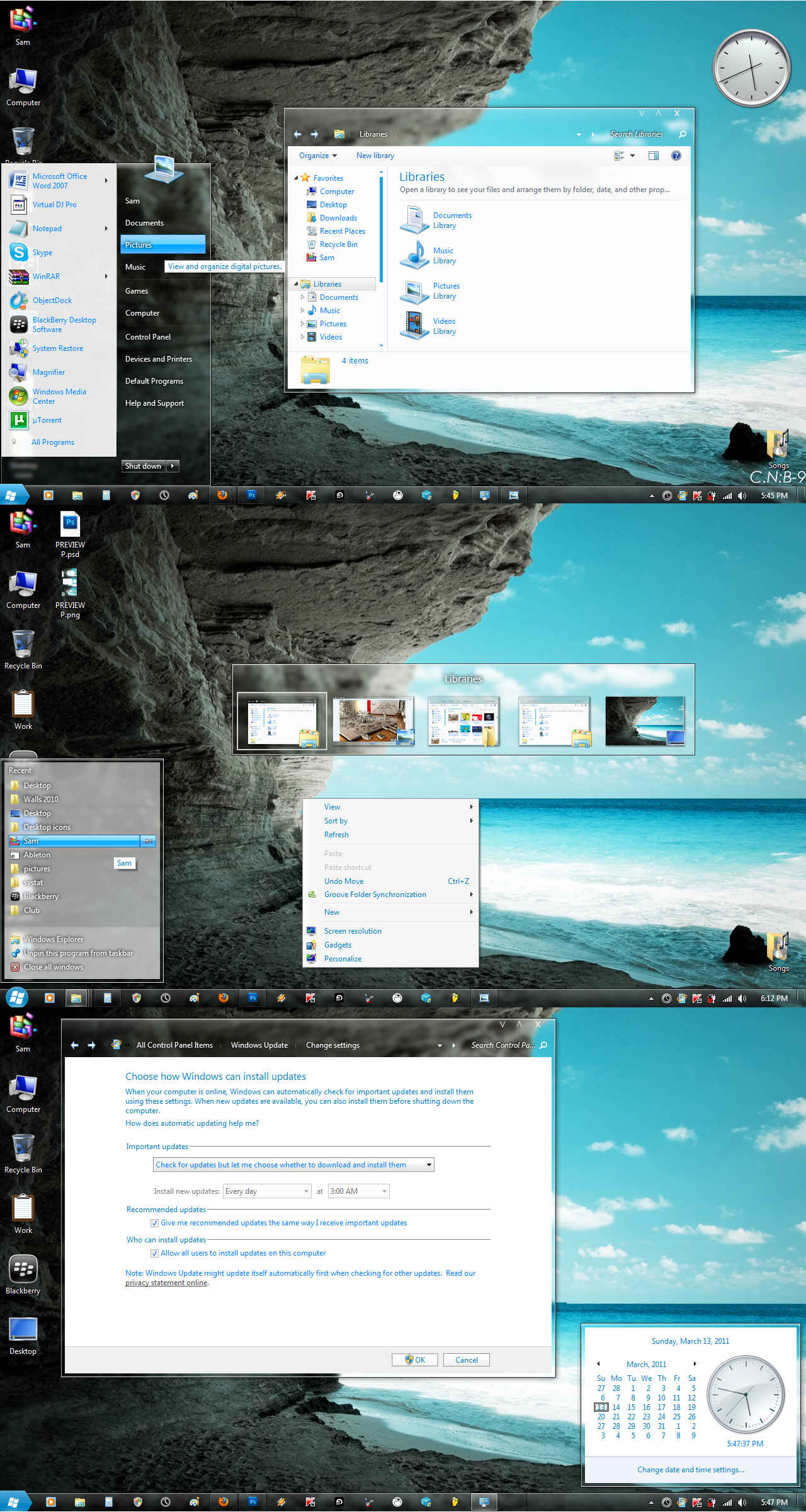
Elune Theme For Windows 7

[Update 3]
- Change text color + Items for Taskbar toolbar.
- New style for Download window if you use IDM.
- New style for Command Link. [link]
- Add new image + fix some problem for Vertical Taskbar.
- Black caption and white glow.
[Update 2]
- Add an image for ListItem on Taskbar Thumbnail.
- Use Segoe UI for Placelist instead of Corbel.
[Update 1]
- Fix wrong patch in theme file for Elune 1.
- Add en-US and Shell folder in Elune to fix problem with Command module and Detail pane.
[Note]
I didn't include explorer.exe because I updated my computer to Windows 7 SP1.
You can use Restorator to change yours by replacing BMP number 6801,6805 & 6809, so do explorerframe.dll
1. Install Universal Theme Patcher
2. Extract .RAR file into C:\Windows\Resources\Themes
3. Take Ownership, rename and replace explorerframe.dll in System32 folder
4. Restart Windows & then select this theme in Personalize Menu
[Preview]
1
2
src="http://pagead2.googlesyndication.com/pagead/show_ads.js">
Subscribe to:
Posts (Atom)